
When you plug in the USB cable, your laptop should automatically swap over to using the Logitech camera automatically, however if it doesn't, you can change it easily.
- Open your Skype Settings
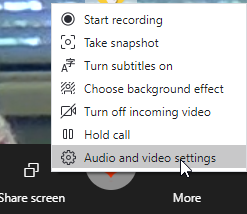
- If you are in a call, click "More" and "Audio and Video Settings"
- If you have not yet started your call, click on the three dots in the top left (next to your name) and then "Settings"

- If you are in a call, click "More" and "Audio and Video Settings"
- At the top of the Settings, you'll be able to change the camera:

- Scroll down to the Audio section and set the Microphone:

- Scroll down a bit further to set the speakers:

Comments
0 comments
Article is closed for comments.